Enter your book specifications below to generate an exact Amazon KDP cover template with precise measurements for front cover, back cover, spine, and bleed areas.
KDP Cover Calculator
By KDPCoverCalculator.Online
Enter Your Book Information
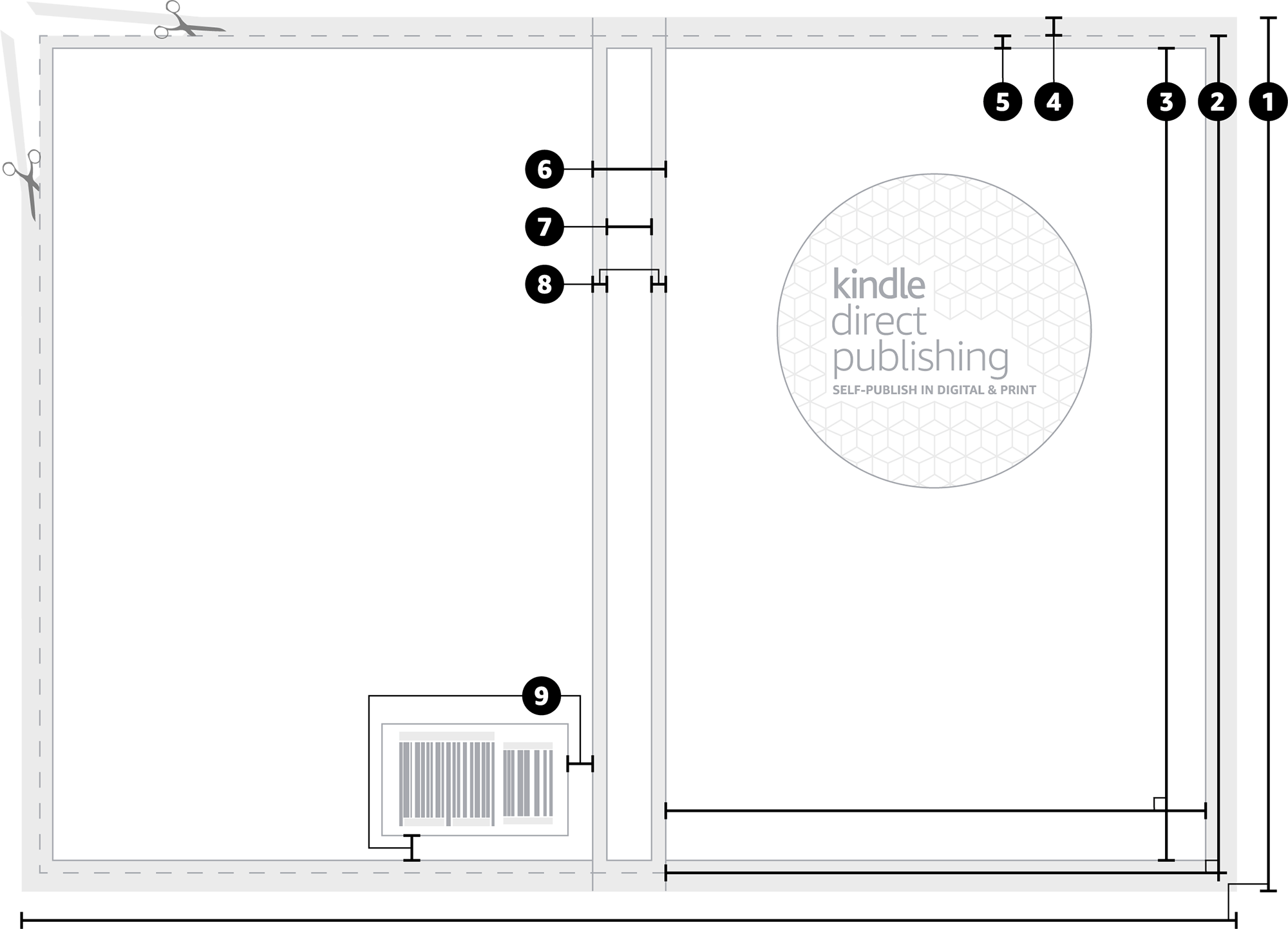
📏 Cover Measurements
| # | Description | Width (mm) | Height (mm) | Info |
|---|---|---|---|---|
| 1 | Full Cover | - | - | |
| 2 | Front Cover | - | - | |
| 3 | Safe Area | - | - | |
| 4 | Bleed | - | - | |
| 5 | Margin | - | - | |
| 6 | Spine | - | - | |
| 7 | Spine Safe Area | - | - | |
| 8 | Spine Margin | - | - | |
| 9 | Barcode Margin | - | - |
🎨 Template Preview
Click "Calculate Dimensions" to generate your template
📋 Template Guide:
This is where your book will be cut.
Fold placement may vary slightly.
Position logos, text, and essential images here.
Background must fill this area.
Reserved for ISBN barcode.
Whatever is visible in your digital artwork will also be visible in your printed artwork.
| Amazon KDP Hardcover Printing Cost Calculator | Amazon KDP Royalties Calculator | Amazon KDP Printing Cost Calculator |
Creating the perfect Amazon KDP cover doesn’t have to be complicated. Our free KDP cover calculator eliminates guesswork by generating precise paperback and hardcover cover templates with exact spine widths based on your page count and paper type. Whether you’re publishing a 6×9 novel, 5×8 memoir, or 8.5×11 workbook, our tool calculates every dimension you need — including bleed areas, safe zones, and barcode placement. Self-publishing authors trust our book cover calculator to create print-ready 300 DPI templates that meet all Amazon KDP requirements. Stop risking cover rejections with incorrect dimensions. Get accurate measurements in seconds — completely free, no registration required.
What Is a KDP Book Cover Size?
Understanding KDP book cover size is essential for self-publishing success. Your cover size isn’t just the front cover — it’s the complete wraparound design that includes the back cover, spine, and front cover as one continuous image.
Understanding Trim Size
The trim size is your book’s final dimensions after cutting. This is what readers see when they hold your book. Popular KDP trim sizes include:
- 6″ × 9″ — Most popular for novels and non-fiction (standard trade size)
- 5″ × 8″ — Compact size for pocket books and short stories
- 5.5″ × 8.5″ — Standard trade paperback size
- 8.5″ × 11″ — Workbooks, journals, and children’s books
Spine Width Formula
The spine width is the most complex part of KDP cover calculations. It varies based on three factors:
- Page count — More pages create a wider spine
- Paper type — Cream paper is thicker than white paper
- Interior type — Black & white vs. color affects thickness
Amazon KDP uses specific formulas to calculate spine width. For black and white interiors on white paper, the formula is: page count × 0.0025 inches. For cream paper, it’s: page count × 0.00275 inches.
Bleed Area Explained
Bleed is the extra 0.125″ (3.2mm) around your cover’s edges that gets trimmed off during printing. Your background must extend to the bleed edge to prevent white borders after cutting. This is non-negotiable for professional results.
Think of bleed as your safety margin — it ensures your cover looks perfect even if the cut isn’t 100% precise. Always extend background colors, images, and patterns to the bleed edge, but keep important text and logos inside the safe zone.
How to Use the KDP Cover Calculator
Using our KDP cover calculator is simple and takes less than 60 seconds:
Step 1: Select Your Book Specifications
Choose your binding type (paperback or hardcover), interior type (black & white, standard color, or premium color), and paper type (white or cream for B&W interiors). Select your reading direction and preferred measurement units (inches or millimeters).
Step 2: Choose Your Trim Size
Pick from our comprehensive list of standard KDP trim sizes, or enter custom dimensions. Our tool supports all Amazon-approved sizes including 5×8, 6×9, 7×10, 8.5×11, and more.
Step 3: Enter Page Count
Input your formatted page count. Our spine calculator automatically determines the exact spine width using Amazon’s official formulas. Minimum 24 pages required for paperback books.
Step 4: Generate and Download
Click “Calculate Dimensions” to see your precise measurements. Review the visual template preview with labeled areas. Click “Download Template” to get your high-resolution 300 DPI PNG file — ready for your design software.
Why Accurate KDP Cover Dimensions Matter
Getting your KDP cover dimensions correct isn’t just about aesthetics — it’s about avoiding costly mistakes that can delay your book launch.
Common Cover Calculation Errors
- Incorrect spine width is causing misaligned text or awkward gaps
- Missing bleed areas resulting in white borders after trimming
- Text placed too close to the edges is getting cut off during production
- Barcode area overlapping with important design elements
- Low-resolution files appear pixelated in print
- Visa-Free Countries for Nigerians: The Complete 2026+27 Travel Guide
How Our Calculator Prevents These Issues
Our KDP cover calculator uses Amazon’s official formulas and requirements to ensure your template is 100% compliant. Every measurement is double-checked, every area is clearly labeled, and every download is print-ready at 300 DPI.
The Cost of Getting It Wrong
A rejected cover file means:
- Delayed publication timeline
- Additional design revision costs
- Frustration and lost momentum
- Potential loss of pre-order sales
Save time, money, and stress by starting with accurate dimensions from day one.
Popular KDP Trim Sizes Explained
6×9 Books (6″ × 9″)
The 6×9 trim size is the gold standard for self-publishing. It’s the most popular choice for novels, memoirs, business books, and non-fiction. This size feels substantial in readers’ hands, maximizes printing efficiency on Amazon KDP, and fits comfortably on bookstore shelves.
Example calculation: A 300-page 6×9 paperback with white paper has:
- Trim size: 6″ × 9″ (152.4mm × 228.6mm)
- Spine width: 0.75″ (19.05mm)
- Full cover size: ~18.75″ × 9.25″ including bleed
5×8 Books (5″ × 8″)
The 5×8 trim size is perfect for pocket novels, short story collections, poetry, and compact non-fiction. It’s portable, cost-effective for shorter books, and appeals to readers who prefer lightweight formats.
8.5×11 Books (8.5″ × 11″)
The 8.5×11 trim size is ideal for workbooks, journals, cookbooks, children’s books, educational materials, and any project that needs more space for images, charts, or interactive elements.
Custom Trim Sizes
Publishing something unique? Our calculator supports custom dimensions in both inches and millimeters. Just enter your width and height, and we’ll calculate the exact cover template you need.
Paperback vs Hardcover Cover Calculations
Paperback Cover Requirements
Paperback books (perfect binding) use flexible cardstock covers. Key considerations:
- Spine width calculated using paper-specific formulas
- Bleed required on all four edges (0.125″)
- Barcode area reserved on the back cover, bottom-right
- Minimum 24 pages required
Hardcover Cover Requirements
Hardcover books (case binding) use rigid boards with dust jackets or printed cases. Key differences:
- Slightly different spine calculation formula (pages × 0.0029″)
- Additional considerations for hinge area and board thickness
- Often requires separate files for the case and the dust jacket
- Higher minimum page counts typically apply
How Our Calculator Handles Both
Simply select your binding type, and our tool automatically applies the correct formulas and requirements. Whether you’re publishing paperback or hardcover, you’ll get precise, compliant templates every time.
What size should my KDP cover be?
Your KDP cover size depends on your trim size and page count. For example, a 6×9 book with 300 pages on white paper has a full cover size of approximately 18.75″ × 9.25″ including spine and bleed. Use our calculator to get exact dimensions for your specific project.
How do I calculate spine width for KDP?
Spine width = page count × paper thickness coefficient. For white paper: pages × 0.0025″. For cream paper: pages × 0.00275″. For hardcover: pages × 0.0029″. Our calculator does this automatically — just enter your page count and paper type.
Does KDP cover size change with page count?
Yes, the spine width changes with page count, which affects the total cover width. More pages = wider spine. The front and back cover dimensions remain the same as your selected trim size.
What is bleed, and why do I need it?
Bleed is an extra 0.125″ (3.2mm) around your cover’s edges that gets trimmed off during printing. Your background must extend to the bleed edge to prevent white borders after cutting. It’s essential for professional, borderless results.
What resolution should my KDP cover file be?
Amazon KDP requires a minimum of 300 DPI (dots per inch) for cover files. Our calculator generates 300 DPI templates to ensure professional print quality. Always export your final design as a high-quality PDF for upload.
Can I use this calculator for hardcover books?
Yes! Our calculator supports both paperback and hardcover cover calculations. Simply select your binding type, and we’ll use the correct spine formula and requirements for your book.
Do I need to include the barcode in my cover design?
Amazon KDP automatically adds the barcode to your back cover during upload. However, you must leave a 2″ × 1.2″ clear area in the bottom right corner of your back cover. Our template shows exactly where this barcode area is located.
What file format should I upload to KDP?
KDP accepts PDF (preferred), PNG, and JPG formats. PDF is best because it preserves quality and dimensions. Our calculator generates PNG files that you can use as a template in design software like Canva, Photoshop, or Affinity, then export as PDF for upload.
Is this KDP cover calculator really free?
Yes! Our KDP cover calculator is 100% free with no registration required. Generate unlimited templates for all your self-publishing projects. No watermarks, no hidden fees, no trial limits.